Contents (12 sections)
Creating a seamless smart home ecosystem is crucial for enhancing your living space with convenience and efficiency. A smart home ecosystem refers to the interconnected network of smart devices operating within your home. These devices can communicate with each other, allowing for automation and remote control, improving the overall functionality and energy efficiency of your living spaces.
Why Opt for a Smart Home Ecosystem?
The contemporary lifestyle heavily leans on technological interventions for comfort and safety. As reported by Les Numériques, the market for smart home devices is projected to grow exponentially, with consumers increasingly seeking automation solutions for energy management, security, and convenience.
Integrating smart devices reduces energy consumption. For example, energy-monitoring plugs can help track usage and optimise operating times, leading to substantial financial savings annually. According to the ADEME, smart home technologies can lower energy bills by up to 30%. Moreover, perceived benefits include improved security, peace of mind, and significant enhancements to daily life. With an array of choices available, understanding how to integrate these devices effectively is essential.
Step 1: Assessing Your Needs and Choosing Devices
Before diving into the integration process, it’s crucial to assess your specific needs and lifestyle. Conducting a thorough evaluation allows you to make informed decisions about which devices will be beneficial. Typically, households may require smart lighting, smart plugs, security cameras, and smart speakers.
When choosing devices, consider compatibility with established hubs or ecosystems, such as Amazon Alexa, Google Home, or Apple HomeKit. Devices certified under the Matter protocol can seamlessly interact with one another across different ecosystems, making them a wise choice for future-proofing your smart home setup. Additionally, involve family members in the decision-making process. Everyone's needs and preferences should be accounted for to ensure broad acceptance of new technology.
Step 2: Establishing Your Smart Home Hub
Choosing a suitable smart home hub is a fundamental step towards a seamless ecosystem. A hub acts as the central command, allowing for interaction among various devices and offering a user-friendly interface. Opt for a hub that supports multiple protocols and denotes compatibility with significant brands and types of devices.
For instance, the TP-Link Smart HomeBase provides local storage and integrates various devices without monthly fees, which can lead to long-term financial savings. Read reviews and consult resources from UFC-Que Choisir to compare different hubs. Missteps in this crucial phase might lead to future connectivity issues or device incompatibility, so thorough research is essential.


Step 3: Installing and Configuring Devices
Installation is often simpler than expected. Follow these general steps for setup:
- Connect your hub to power and your router: Ensure your hub is positioned centrally in your home for optimal signal coverage.
- Download the corresponding app for your hub and create an account if necessary.
- Connect your devices: Follow the manufacturer’s specific instructions for each device. For instance, for smart plugs, adding them to your network typically involves pressing a button on the device during the pairing process.
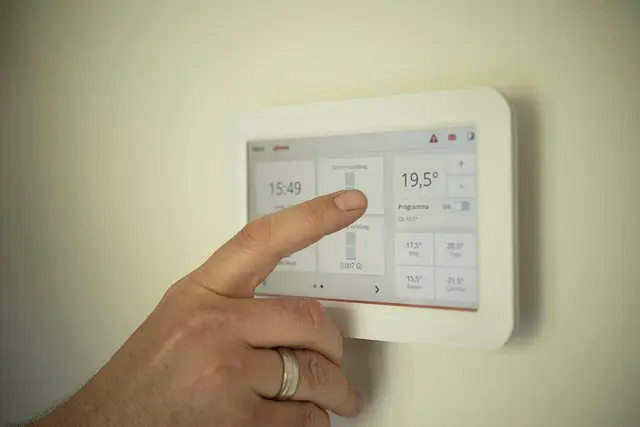
- Configure automation and routines: This involves setting up specific commands that trigger device actions. Common examples include programming your lights to turn on at sunset or setting your thermostat to lower temperatures automatically when you leave the house. This step can significantly enhance your home’s efficiency and security.
Recommended Products
In our guide, we have selected several products that are perfect for establishing your smart home ecosystem. Consider exploring the options below for each category of essential device, ensuring you find the right fit for your needs.
Step 4: Creating Effective Automations
Once your devices are installed and configured, it’s time to explore the realm of automations. Effective automations elevate the functionality of your smart home system and further enhance energy conservation. Implementing methods such as a smart lighting system that adjusts according to specific activities or time can lead to significant increases in convenience and utility.
For example, during weekdays, you might want the lights to turn on automatically when you arrive home from work, while on weekends, a different routine might be more desirable. Pro-tip: Start with simple automations and gradually introduce more complex setups to avoid feeling overwhelmed. Keep track of your preferences and adjust automations accordingly based on family feedback.
Step 5: Regular Maintenance and Updates
With technology constantly evolving, regular updates and maintenance of your smart home devices are paramount. Familiarise yourself with the specific needs for each type of device, as some may necessitate firmware updates or periodic reconfigurations. Significantly, check compatibility with newer devices or updates to ensure a cohesive ecosystem.
Furthermore, consider scheduling a monthly check-up of your systems, reviewing settings, and ensuring everything is functioning optimally. Frequent maintenance helps prevent issues and allows you to keep up with new functionalities that can enhance your smart home experience.
Checklist Before You Buy
- [ ] Assess which devices you need
- [ ] Research compatible hubs
- [ ] Read user reviews on installation
- [ ] Set up some initial automations
- [ ] Plan for regular maintenance
📺 Resource Video
> 📺 For further insight: Watch comprehensive guides on smart home setup by searching on YouTube: 'smart home integration tutorial 2026'.


Glossary
| Terme | Définition |
|---|---|
| Smart Home Ecosystem | Un réseau interconnecté de dispositifs intelligents qui communiquent entre eux pour automatiser les fonctions domestiques. |
| Hub | Un appareil central permettant la connexion et le contrôle de différents dispositifs intelligents. |
| Automatisation | Processus de programmation de dispositifs pour exécuter des actions automatiquement selon des conditions prédéterminées. |
Quiz rapide
> 🧠 Quiz rapide : Quel est le premier étape vers une intégration réussie des appareils intelligents ?
> - A) Choisir des appareils au hasard
> - B) Évaluer vos besoins
> - C) Configurer tous les appareils immédiatement
> Réponse : B — Une évaluation minutieuse de vos besoins facilite le choix des appareils appropriés.
Integrating a smart home ecosystem may appear complex initially, but following these steps will guide you to a harmonious living space that adds both functionality and enjoyment. Don’t hesitate to explore our products below to get started on your smart home journey!
📺 Pour aller plus loin : smart home integration tutorial 2026 sur YouTube
Recommended products
Selected by our experts